claude-transplant
Move Claude Code history between accounts in Claude Desktop. Menubar or CLI.


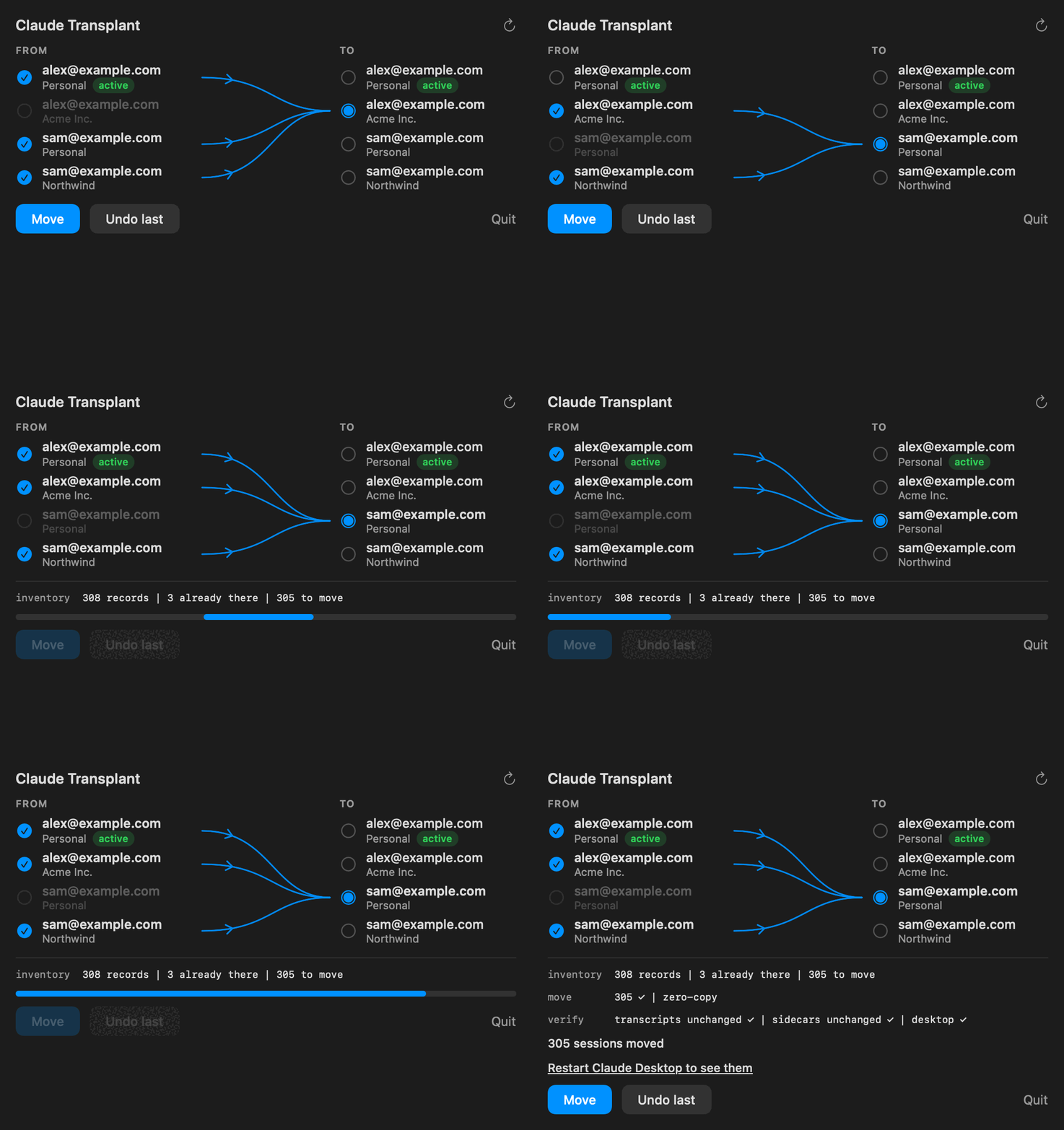
Different accounts, the same conversations
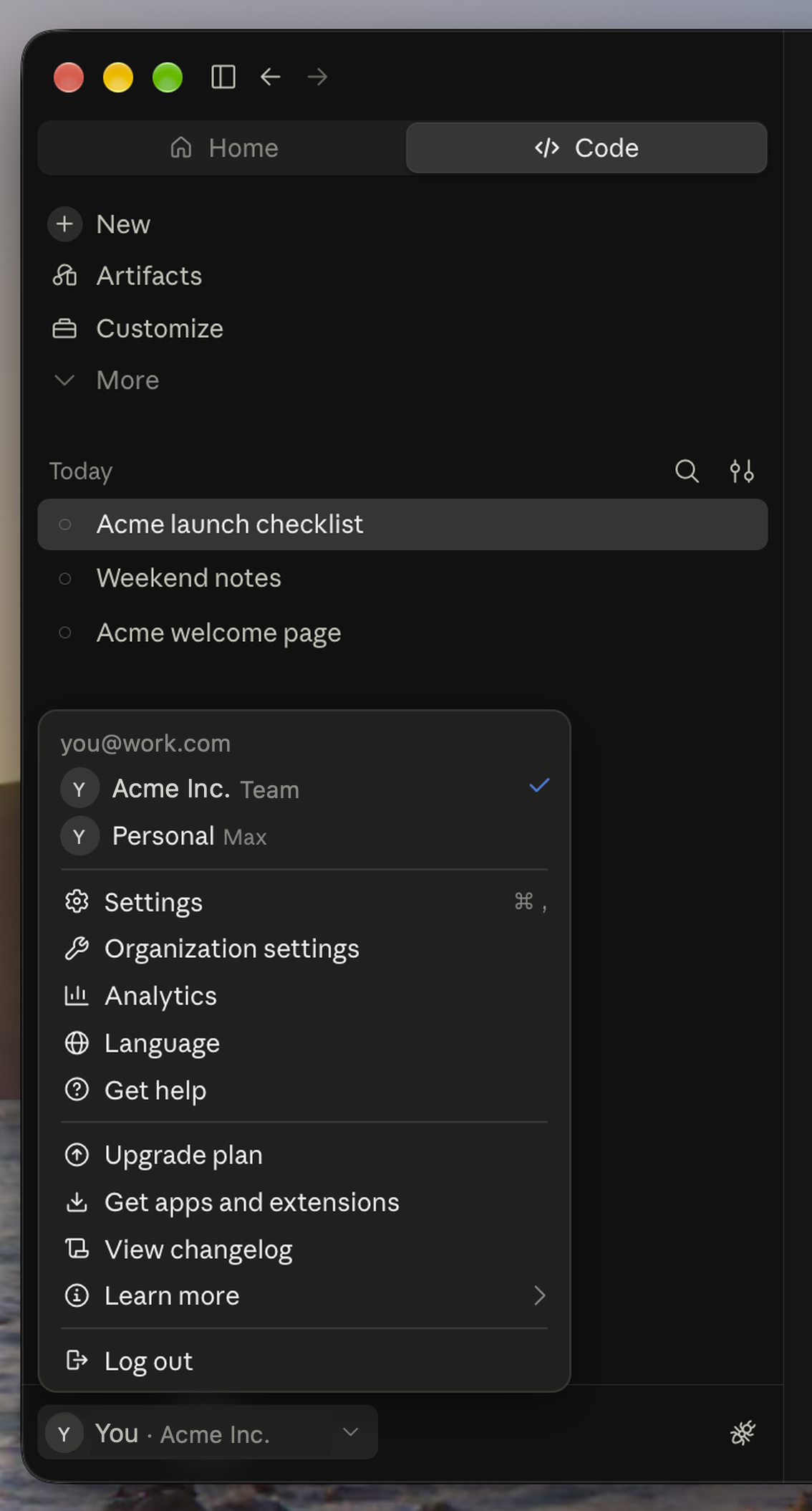 Work account before Move you@work.com · Acme Inc. |
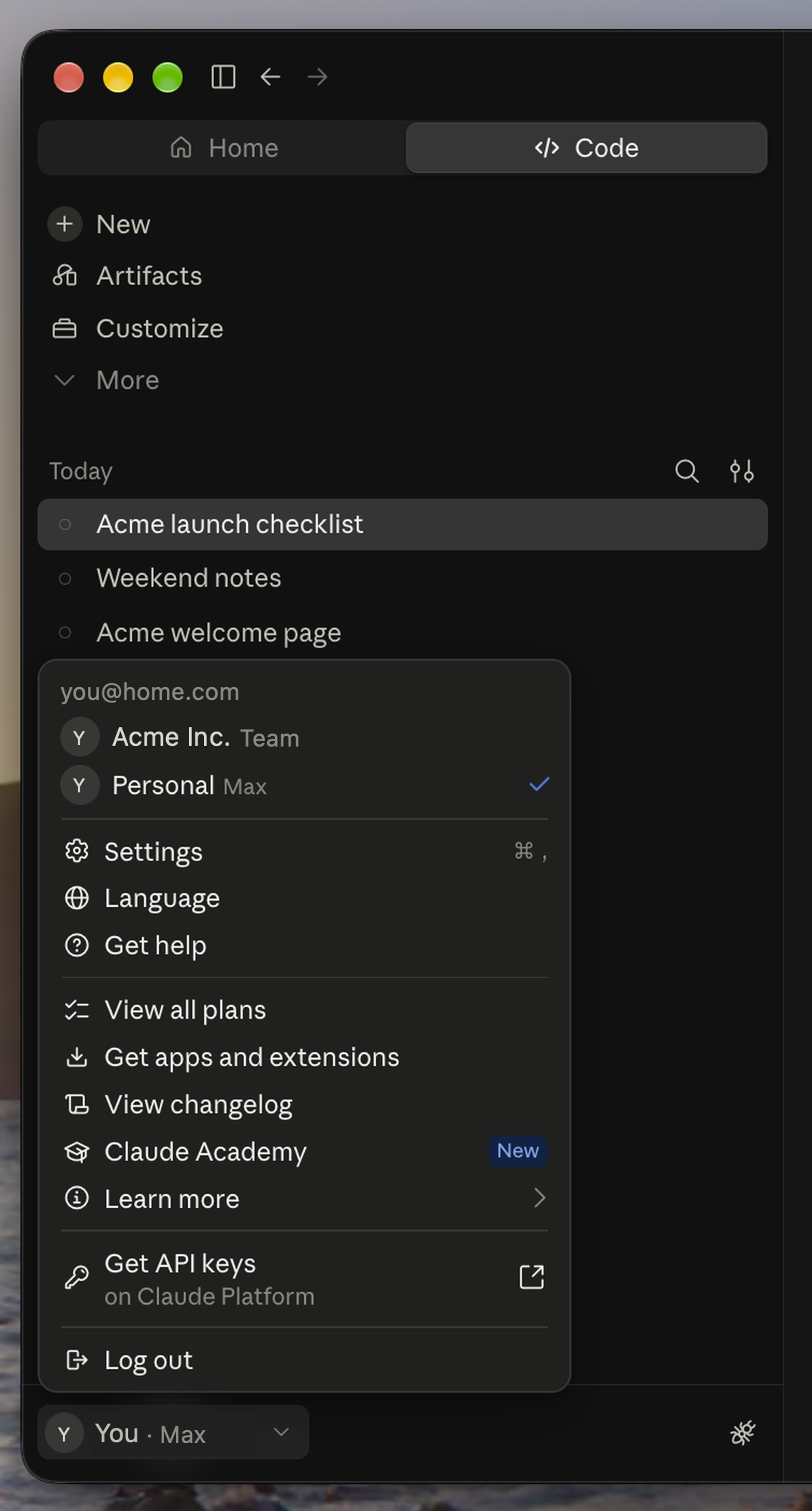 Personal account after Move you@home.com · Personal |
- Your work account shows your conversations in the Code sidebar.
- Sign into Personal and see an empty Code sidebar after switching accounts.
- Move the sessions from work to Personal, then reload that account in Desktop.
- Open a moved session and continue the same conversation.
Quick start
npx claude-transplant menubar
Open the panel from the menu bar, check the accounts to take from, pick the one to land in, click Move. Sign Claude Desktop into that account and the sessions are listed there.
What it does
Switch accounts in Claude Desktop and the Code sidebar goes empty. The session history is not lost. Desktop lists each Claude Code session under the account and organization that created it, so a personal plan, a Team seat, or a second Max subscription each sees only its own. This tool moves that history to the account you are using.
- Moves local Desktop session records to another account. Transcripts and sidecars stay on disk, sessions keep their ids, nothing is copied.
- Sessions owned by a running Desktop worker are held until you approve a restart, or skipped with Move only the rest.
--cloudreconciles Remote Control for the signed-in source. No model runs, no artifact is recreated.undoreverses the whole move.- macOS today, PRs for Windows and Linux welcome. Unofficial, not affiliated with Anthropic.
Where it fits next to the other tools people find for this problem:
| Tool | Layer | Effect on the Desktop Code sidebar |
|---|---|---|
| claude-swap, claude-acc, CCSwitcher, clauth | swap the CLI login | none, Desktop keeps its own login and its own sidebar |
CLAUDE_CONFIG_DIR |
separate CLI config directory | none |
| restore-desktop-sessions | copies record files into the active account | sessions appear under both accounts and the copies drift apart |
| claude-code-session-restorer | rebuilds record files from transcripts on Windows | recovers a sidebar whose records were deleted |
| claude-transplant | moves record files between accounts, verified, with undo | history follows you, one account lists each session |
Install
Node 22 or newer. The menubar also needs the Xcode command line tools: xcode-select --install
npx claude-transplant menubar   # install the menubar app
npx claude-transplant           # CLI
npm i -g claude-transplant      # global install, then claude-transplant
From this repo instead of npm: npx github:vitaliyhayda/claude-transplant (append a tag or commit hash to pin).
The CLI touches the network and Keychain only when you pass --cloud. The menubar's Move always passes it, reconciling Remote Control through Desktop's own claude.ai session, and stores nothing.
Menubar
- Two columns: FROM on the left, TO on the right. Uncheck accounts to leave behind.
- When the active account is known, TO defaults to the most recently used other account and every other account starts as a source. Otherwise pick TO yourself.
- Open local sessions offer Stop and restart. Finish move continues the same receipt. Keep completed cancels remaining work without reversing completed moves.
- Held local work retries when its workers stop. Pending cloud sources retry when that account signs in.
- Move always runs with
--cloud, so the source's Remote Control mirrors are reconciled in the same run. - Starts at login, shows progress in the icon, notifies when done.
- Bundles its own CLI, so rerun
menubarafter upgrading. menubar --snapshot panel.pngrenders the live panel,menubar --removeuninstalls,--demo <dir>renders the animation above.
CLI
From  ↑↓ move · space select · enter next
  ❯ ◉ you@work.com · Acme Inc.    161 | 2h ago | acme-api | active
    ◉ you@work.com · Personal     157 | 1d ago | acme-api
    ○ you@home.com · Personal       3 | 5d ago | notes
    ○ you@work2.com · Northwind     12 | 4m ago | northwind

To    ↑↓ move · enter confirm
  ❯ ● you@home.com · Personal       3 | 5d ago | notes

  inventory   318 records | 3 already there | 307 to move
  move        308 ✓ | 307 zero-copy | 1 rescued
  verify      transcripts unchanged ✓ | sidecars unchanged ✓ | desktop ✓

  receipt     ~/Library/Application Support/claude-transplant/2026-09-02T16-04-11-208.json
  undo        npx claude-transplant undo
| Command | Effect |
|---|---|
claude-transplant |
pick From and To, move, print a receipt |
--dry-run |
plan only, write nothing |
undo |
quarantine the last move and restore source entries and task registrations, refused if a target changed or a source cannot be restored |
finish |
recover interrupted task transfers, finish held local records or active-source cloud checks, continue a staged undo, and list earlier refusals as information |
sweep |
verify placed records and retry eligible pending work, never requests a restart |
restart |
show the plan for the existing Desktop refresh action |
keep-local |
cancel remaining work and cloud checks, keep completed moves |
accounts |
list accounts |
menubar |
install the menubar app (--snapshot <png>, --remove) |
--from <match> --to <match> |
skip the picker, repeat --from, match on email, org name, or uuid prefix |
--move-only |
move eligible records, leave Desktop-owned records held |
--restart-approved <token> |
approve the exact restart plan printed for the requested operation |
--cloud |
reconcile the active source, queue inaccessible sources that still have unreadable or unarchived local records |
--json |
one event per line |
--version |
print the version |
What each command touches
Every command may write the tool's own files under ~/Library/Application Support/claude-transplant: cache, lock, restart plan, receipts, quarantine, and drift evidence. A move, finish, sweep, undo, and restart first finish any interrupted move, retirement, undo, or restart, which can move records, rewrite the receipt and quarantine, and reopen Claude Desktop. --dry-run and keep-local refuse in that state instead.
| Command | Beyond the tool's own folder |
|---|---|
accounts, --dry-run, --version, keep-local |
nothing, --dry-run --cloud also reads Remote Control metadata over the network |
restart without a token |
nothing beyond the recovery above |
move, finish, sweep, undo |
Desktop session records and scheduled task registries under claude-code-sessions |
--restart-approved <token> |
quits and reopens Claude Desktop around the requested operation |
a move with --cloud, and finish, sweep, undo, or restart while the receipt has pending or staged cloud work |
Desktop's claude.ai session read from Keychain in memory, network to claude.ai only, Remote Control mirrors archived or restored there, rescued local transcripts when a remote branch diverged |
menubar, menubar --remove |
the app bundle in the tool's folder and a LaunchAgent under ~/Library/LaunchAgents |
| Move in the menubar | the same as a move with --cloud, the panel always passes it |
menubar --snapshot <png> |
that image file |
Command and flag names are stable. Renames get a deprecation release first.
FAQ
Why is the Code sidebar empty after switching accounts?
Desktop keeps one record per session under ~/Library/Application Support/Claude/claude-code-sessions/<account>/<organization> and lists only the signed-in folder. The transcripts in ~/.claude/projects are shared by every account and untouched.
My sessions disappeared after signing out, an update, or a reset. Is this the fix?
Only when the records still exist under another account or organization. If a reset or update deleted them there is nothing to move, the transcripts survive and claude --resume in the terminal still lists them, and the sidebar needs its records rebuilt.
Do I have to move history back when I return to the first account?
Yes, it is a move, not a copy. Moving back is the same one click and takes seconds to a minute, longer only when a Desktop restart is needed.
Can I continue the same session under the other account?
Yes. It keeps its id, and the next message goes through the account you are signed into with the whole conversation as context. Personal history moved into a Team or Enterprise organization becomes that organization's data.
Can a Team or Enterprise admin see moved history?
Team owners get usage analytics only. Enterprise compliance tooling can retrieve Claude Code session transcripts, and the next message in a moved session sends its whole conversation to that organization.
Does it work on Windows or Linux?
Not yet. Desktop uses the same per-account folder layout there, under its app data directory, so the CLI needs only the platform paths and process checks, and the menubar stays macOS. PRs welcome, and claude-code-session-restorer covers Windows rebuilds meanwhile.
Shorter answers:
- Does a move use tokens or talk to a model? No. Continuing a moved session costs the same as resuming any session after a break, and the prompt cache is per organization, so the first message after a switch never hits it either way.
- Which plans and accounts work? Any plan that runs Claude Code in Claude Desktop, Pro, Max, Team, or Enterprise. Two organizations on one email, a Team seat next to a personal plan, are two sidebars and both are supported.
- What happens to sessions that are running when I switch? Desktop ends the workers of the account you leave. Sessions with a running worker are held until you approve a restart, or skipped with Move only the rest.
- Is anything uploaded or read from Keychain? From the CLI, not unless you pass
--cloud. The menubar's Move always passes it: Desktop's claude.ai session is read from Keychain in memory, sent only to claude.ai to reconcile Remote Control mirrors, and never stored. - What about Remote Control and cloud sessions? They stay with the account that created them.
--cloudarchives the source's mirrors after the local copy verifies, and you re-enable Remote Control per session under the new account. - Can I undo? Yes.
undoputs every record back, all or nothing, and refuses if a moved session changed on the target side, is still open, or a new fork still needs the moved parent. - Does the CLI or the VS Code extension have this problem? The CLI does not,
claude --resumereads the shared transcripts regardless of login. The VS Code extension keeps its own session index, untested and not handled here. - What about Claude chats and Projects? Those live on claude.ai per organization and are not touched.
- Can I do it by hand? For task-free sessions, quit Desktop, move the record file into the other account's organization folder, then reopen Desktop. Do it only while Desktop is closed, it rewrites records it has open from memory.
Anthropic issues that describe the same problem: 74662 tracks the per-account scoping, 85294 the root cause, 26452 and 48511 the disappearing sessions, 18435 and 30031 the request for account profiles.
Discussed on Hacker News
Manual walkthrough: recovering missing Claude Desktop history
How it works
A session is three files: the transcript in ~/.claude/projects, the sidecar directory beside it, and the record under ~/Library/Application Support/Claude/claude-code-sessions/<account>/<organization>. The transcript pool is shared across accounts, so a move writes the same record into the target organization with the same cliSessionId, verifies that transcript, sidecars, and both records are unchanged, then parks the source record in quarantine.
Eligibility:
- history is a single comparable version
- record filename and identity are valid
- no running worker owns it, and any task registrations, generated runs, notification routes, parents, and forks form a complete movable family
- parent record is already in the target or moves first in the same batch, and stays wherever surviving forks refer to it, including archived forks or forks without history
- no id collision in the target
Worker identity uses the Desktop record id, CLI session id, PID, process start time, and ancestry, plus ~/.claude/sessions/<pid>.json for workers that omit the session id. External CLI workers are always refused because restarting Desktop does not stop them.
Restarts:
- When an operation needs Desktop to close, the engine emits a plan first. The menubar warns which Code workers, windows, Chat, Cowork, and background commands will close.
- Stop and restart approves that exact process inventory. A changed inventory invalidates approval. Task registry changes require Desktop to be stopped or both source and target account/organization pairs to be known inactive. An active or unknown scheduler requires this plan even without a worker. Other cold moves show no dialog.
- An approved restart sends a graceful quit, waits for Desktop and its descendants to exit, moves the held records, and reopens Desktop. 30 second budget, no force kill, no cloud work in that window. A veto or missed deadline leaves held records untouched.
- Background retries never start a new shutdown.
Remote Control (--cloud):
- Reads the active selected source through Claude Desktop's authenticated
claude.aisession. Cookies are decrypted in memory via Keychain, sent only toclaude.ai, never stored. - After history verification, a single matching local target or a unique bridge link among matching targets identifies the destination. Otherwise a same-title target must share eight consecutive exact remote messages to anchor a separate companion whose supported payloads are copied exactly into a new local transcript.
- The source mirror is archived only after the remote worker is disconnected and unchanged and the local target verifies.
- Inaccessible sources become pending only when unreadable or unarchived local records remain. Retries check identity, history, and connection state before touching a remote row. A failed source stays active and retryable.
Safety:
- One receipt owns the move, held records, cloud checks, failures, and retries. Another move cannot start until it is complete, kept local, or undone.
- Records are written to a private temp inode, journaled, then exposed by an atomic no-clobber hard link. A record is either absent or complete.
- Interrupted retirement or undo resumes from the receipt. Finish move exposes interrupted task recovery and offers restart approval when the scheduler is active. Task families preserve reminders, run history, prompts and unrelated settings. Recovery rolls back only unfinished families. Undo restores the whole move. A corrupt newest receipt stops undo.
- Later moves and sweeps report changes to title, archive state, and starred state under
drift/<receipt>. Other Desktop bookkeeping stays quiet. Missing or unreadable records retain a warning. Undo, retirement, and source archival also ignore branch and PR bookkeeping. - Background checks keep the panel enabled. A click captures its command and selection, shows a waiting state, and cannot be replaced by another action before the check finishes.
- Lineage follows
forkedFrompointers to their roots. Duplicate message ids count as sync replays when only runtime metadata differs, or an otherwise identical copy leaves command output or file-read content empty. Conflicting contents are refused. - A disposable planning cache lives at
~/Library/Application Support/claude-transplant/cache.json. Every write decision uses live files. Delete it any time.
Reading the output
- without history: transcript no longer exists on disk
- unreadable: Desktop record is not valid JSON. Retirement or undo cannot remove records from its folder until the file is fixed or removed
- source rejected / target rejected: invalid identity or unsafe transcript history, left untouched
- compatible source versions: same history in several transcript files without an explicit Desktop fork, blocked unless the target already holds every version
- overlapping versions: shared lineage kept separate, including Desktop forks with separate transcripts
- already there: a compatible Desktop record in the target holds every message and sidecar file
- held: a Desktop worker or scheduler owns required records, restart approval is offered
- blocked: needs merging, has a collision or unresolved parent, has an incomplete task family, or is owned by an external CLI worker
- retired: source entries moved to quarantine after verification
- cloud mirrors: active or paused Remote Control rows under the signed-in source
- cloud rescue: one divergent remote branch materialized as a separate local session from exact message payloads
- cloud blocked: no unambiguous local anchor, unsupported payload, connected worker, changed history, or account mismatch
- cloud checks pending: inaccessible sources that still have unreadable or unarchived local records
- newer cloud sessions: rows created after Move, left for the next move
Accounts are labeled from ~/.claude.json, its backups, ~/.claude* profile directories, ~/.claude-switch/accounts/* config directories, and Desktop's agent-mode records. Personal-plan organizations show as Personal. Accounts with no known email show a uuid prefix, session count, last activity, and most common project folder.
Active identity comes from the newest complete initialization entry in Claude Desktop's main.log for the current Desktop process. A logout, unfinished switch, initialization failure, or config conflict clears it and the panel shows unknown. No Keychain access or network request is used for the badge. Desktop must be running.
Rules
- Rehome local history or refuse. Never duplicate a local transcript, never merge histories.
- No transcript or sidecar is renamed, edited, or deleted. The quarantined record is the rollback.
- Moves with no active worker or affected scheduler need no confirmation. Desktop restarts require exact plan approval or the saved warning preference.
- Remote rescue copies payloads exactly. No model reconstructs history.
- Remote Control is touched only with
--cloud, with no credential persistence. - Automatic retries cover the receipt's named work only. They never start a restart, store credentials, or create destination bridges.
- One JavaScript file, no dependencies, Node 22. The menubar is one Swift file.
Not done, and why
| Tried | Result |
|---|---|
| Change ownership on the server | No API reassigns a session |
claude --fork-session |
Copies only the compacted chain and grows disk use |
| Copy an existing local transcript | The pool is already shared, a duplicate is only disk |
| Delete the source | Removes the rollback |
| Merge sidecars across versions | Requires writing a new generation |
| Move a record while its Desktop worker runs | Desktop rewrites the record from cache, title and turn count roll back |
| Infer a restart-safe moment from activity logs | Cold records need no restart, held records get an explicit graceful shutdown |
| Repair changed records from old snapshots | Would overwrite legitimate title, archive, and pin edits |
| Read the active org from Desktop's extensions allowlist timestamp | Can point at the wrong org after a failed refresh |
Trust the lastActiveOrg cookie for the active organization |
Stale after an in-Desktop switch, the log-derived identity wins and the cookie is a fallback |
Limits
- macOS 13 or newer with Claude Desktop. Sign Desktop into the target account to see moved history.
- Remote Control ownership does not transfer. Re-enable it per session under the destination account.
- Artifact ownership, versions, comments, and share links stay with the original account.
- Embedded base64, text, and HTTP(S) images and documents can be rescued. Account-owned file ids and unknown shapes are refused.
- Remote Control uses private Claude endpoints and fails closed if their shape or auth changes.
- File layouts, log wording, and endpoints are undocumented and may change. Tested combinations are in the table below.
- Moving history out of a Team organization is your organization's decision.
| claude-transplant | macOS | Claude Desktop | Claude Code | Tested |
|---|---|---|---|---|
| 4.0.6 | 27.0 | 1.52386.3 | 2.1.266 | 2026-09-12 |
| 4.0.5 | 27.0 | 1.49585.0 | 2.1.260 | 2026-09-08 |
| 4.0.4 | 27.0 | 1.46388.4 | 2.1.260 | 2026-09-08 |
| 4.0.3 | 27.0 | 1.46388.4 | 2.1.260 | 2026-09-07 |
Receipts, quarantine, drift evidence, cache, and the menubar app live in ~/Library/Application Support/claude-transplant. Delete quarantine once its receipts are no longer wanted. A kernel lock prevents overlapping runs. MIT.